
If you upload 25 image files, the following page will be created.
(Large images are uploaded very quickly because the client device uploads a thumbnail image.)
You need to remember Six of the 25 personal images in order.
Example I (remember in order of age):
1. Grandpa car 2. Grandma car 3. Dad car
4. Mom car 5. Old boy car 6. Small daughter car
You can configure password images with various personal photos.
Example II (using your belongings picture):
1. Grandfather's notebook 2. Grandma clock 3. Dad car
4. Mother's shoes 5. Older sneakers 6. Small daughter bags
Example III (using a building image similar to the school):
1. My kindergarten 2. Elementary school 3. Middle school
4. High School 5. University 6. Workplace
It is better to remember if using like this rule.
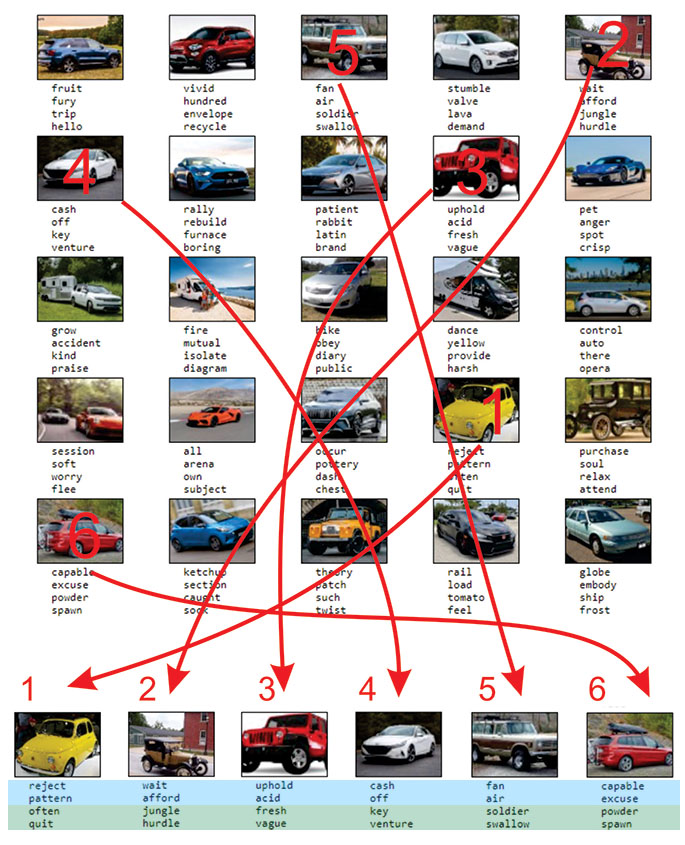
In the next example, the words located in the same coordinates of the images of the previous example
are the words of recovery of the wallet
(Large images are uploaded very quickly because the client device uploads a thumbnail image.)
You need to remember Six of the 25 personal images in order.
Example I (remember in order of age):
1. Grandpa car 2. Grandma car 3. Dad car
4. Mom car 5. Old boy car 6. Small daughter car
You can configure password images with various personal photos.
Example II (using your belongings picture):
1. Grandfather's notebook 2. Grandma clock 3. Dad car
4. Mother's shoes 5. Older sneakers 6. Small daughter bags
Example III (using a building image similar to the school):
1. My kindergarten 2. Elementary school 3. Middle school
4. High School 5. University 6. Workplace
It is better to remember if using like this rule.
In the next example, the words located in the same coordinates of the images of the previous example
are the words of recovery of the wallet
| Light Blue Zone | 1 : reject 2 : pattern 3 : wait 4 : afford 5 : uphold 6 : acid 7 : cash 8 : off 9 : fan 10 : air 11 : capable 12 : excuse |
| Green Zone | 1: often 2 : quit 3 : jungle 4 : hurdle 5: fresh 6 : vague 7 : key 8 : venture 9: soldier 10 : swallow 11 : powder 12 : spawn |
If you use an existing wallet
Click on the text box corresponding to the location of the selected image to modify the words.
(The random seed is automatically completed).
Enter everything and verify the recovery words correctly.
Best Way to use!
Each time you enter a View page, the position of the image and the words are presented randomly.
with those words you can create a wallet.
In your hardware wallet, set the recovery option and enter the recovery words using text box that
corresponds to the coordinates of the remembered image.
Print the created page. You can keep several copies in several locations.
It is safe to take pictures and keep them in digital form, but leaving only on paper is the safest way.